Ubuntu 10.04 to Sabily Manarat 10.04

25 comments

I had a little time to try converting from Ubuntu 10.04 to Sabily Manarat 10.04 and it was successfully work. So I think this experience is very important to Ubuntu user who had feel to change their Ubuntu to Sabily but unsure to do it. Converting from Ubuntu to Sabily are more easy to do compare with upgrading from Sabily Gaza to Sabily Manarat which we need to upgrade it to previous Ubuntu then convert it back to Sabily. I will discuss about upgrading later. Please note that I try this from inside my Virtualbox since I already use Sabily Manarat. Anyway it will work same as normal operating system installation.
I also hope this guide will attract Ubuntu user especially Muslim to convert their distro to Sabily and support for Islamic software development. Lets follow this guide to convert from Ubuntu 10.04 to Sabily Manarat.

Please make sure your Internet connection and speed is good. Then you can try this.

1. Open your terminal and run this command, sudo add-apt-repository ppa:sabily.team/ppa && sudo apt-get -q update


2. Then this command, sudo apt-get install sabily


3. To continue, enter 'Y'.


4. Wait until finish. About 10 to 20 minutes on my system.


5. It finished. Exit terminal and reboot your system.


6. You got it. Sabily Manarat take place but mix with Ubuntu theme.


7. To fully customize Sabily Manarat, you should change theme to HumanME and change to Manarat wallpaper that you can find from, File System/lib/plymouth/themes/sabily
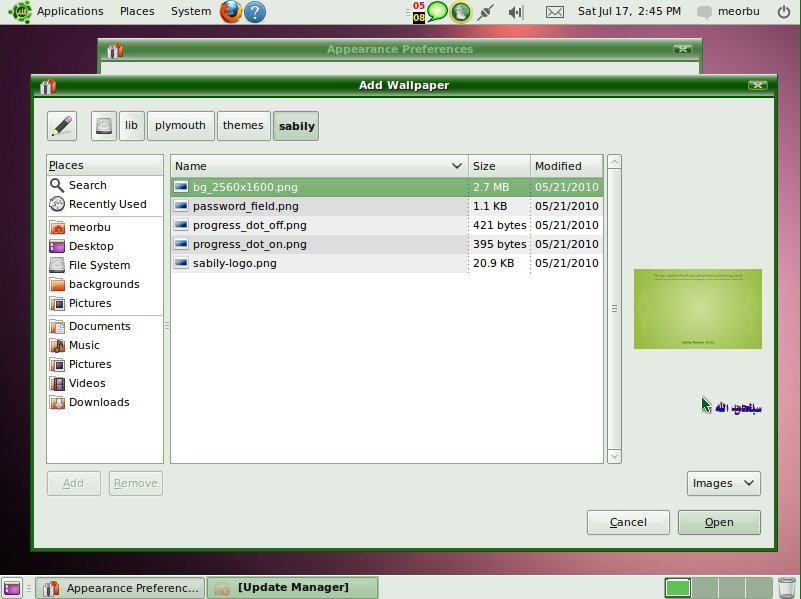

8. Then you really got Sabily Manarat 10.04.


Congratulation for your successfully converting from Ubuntu 10.04 to Sabily Manarat 10.04. Lets spread this info to others.

linuX-gamers - More Games for Ubuntu Sabily

0 comments

What about more games on Sabily or Ubuntu? Now I found solution for this by installing linuX-gamers distro inside my Sabily by using Virtualbox and I can play it very smooth.
So, linuX-gamers is design only for playing games distro. You can burn it on CD or make bootable USB then run it on your machine without need to install it on your hard drive. Very good solution for Linux addicted gamers. It also support for 3D games like Serious Sam or Quake Wars.
For me, I found it as solution for less games that bundled with Sabily package. My son very happy about this.
You can see a screenshot of linuX-gamers that run inside my Sabily. More information can be get at http://live.linux-gamers.net. Enjoy gaming..

Start installation of linuX-gamers inside my Sabily by using Virtualbox.


linuX-gamers on action.


List of the games on CD lite version. More on DVD or USB big version.


How to Upgrade Sabily

23 comments

This is special for previous Sabily user. If you want to upgrade Sabily Gaza to Sabily Manarat, you can follow this command from your terminal. This information is from Mr. Abdelmonam through e-mel.

sudo add-apt-repository ppa:sabily.team/ppa && sudo apt-get -q update
sudo apt-get install sabily


Answer 'Yes' when needed.

This information also can be found on Sabily homepage.

So you don't need to make new installation which will delete your data in the previous version.


Sabily 10.04 Manarat - Download

0 comments

So, where should we download and get Sabily 10.04 Manarat? For Sabily team member at Launchpad, we will be inform for release of new version from Mr, Mehdi or for the previous 9.10 Gaza from Mr. Abdelmonam by emel. Then we will download it fast from Wuala where almost some of Sabily team member have account there. If you want fast information about it, you also should joint Sabily team and create an account there. Then, the creator will put it on Sabily.org server for public access. Remember that it size slightly big then if you have problem with your internet speed you will be unable to download it. Unless if you use Firefox that enable continuous download process but it also depend on the host server condition.

So for non member, you can download it from official Sabily homepage here. I will split the small version of Sabily Manarat to help anybody that facing problem download from Sabily homepage. You can get it part by part from the link that I will put later. Let support and download it.

Example of Sabily Manarat ISO file that added on Wuala.


Sabily Manarat ISO file on Sabily homepage. Also can be download from Download Area page.


Sabily 10.04 Manarat

1 comments

Sabily team already finished their work on Manarat version. They launched it end of June 2010. Slightly lated from Ubuntu 10.04 which should be on April 2010. Anyway let experience about it with me. I hope you already decide to download and install it on your system. In this article, I will make some review about it. I will share how to get and install it on the next article. Here are some screenshot of Sabily 10.04 Manarat.

This is default screen after installation of Sabily Manarat successes. Shows Minbar and Monajat applications running.


List of Islamic software that installed in Sabily Manarat. Same as Sabily Gaza but in Manarat added new version of the software.


List of Preferences that we can customize.


New parental control application added named Nanny. Detail about Nanny on next article.


Some new wallpaper. Same as Ubuntu but added with Sabily Manarat one.


So, lets download and install it an upgrade our systems to the latest version of Sabily.

Share